Short answer: use Geotab's built-in reports for standard questions, Geotab Ace for one-off questions in plain English, a custom report for the spreadsheet someone rebuilds every week, and a custom add-in when your team needs a screen MyGeotab doesn't have. An AI integration makes sense once you want answers from Geotab and your other systems together.
Most fleets collect far more data than they use. The problem is usually not the data. It's that the answer takes too many clicks, lives in an export, or needs someone who knows where to look. Here is how to pick the right tool for each kind of question.
1. Start with the question
Before you pick a tool, write down the question, who needs the answer, and how often. Then match it here.
| Your question looks like… | Best fit |
|---|---|
| “Show me last week's trips for Truck 12.” | Built-in report |
| “Which trucks idled more than an hour yesterday?” | Geotab Ace |
| “Every Monday, send me miles by state for each vehicle.” | Custom report |
| “Show my open defects and who owns each one, on one screen.” | Custom add-in |
| “Compare time on site with the jobs in our scheduling system.” | AI or system integration |
2. Built-in reports: start here
MyGeotab ships with reports for trips, idling, exceptions, faults, hours of service and more. They can be scheduled and emailed. For many questions, the right answer is a built-in report with the correct groups, rules and date range.
Built-in reports run out when you need a different layout, a calculation Geotab doesn't do, or data from somewhere else. The sign is easy to spot: someone exports to a spreadsheet and fixes it up by hand every week.
3. Custom reports: build it once
A custom report pulls the same Geotab data and shapes it the way your team reads it. Common examples:
- Miles by state for each vehicle and month, for fuel tax and IFTA prep.
- Fuel, mileage and idle by vehicle, with the worst offenders at the top.
- Job arrival and departure times matched to the job list your office keeps.
- Inspection and defect counts for the safety meeting or an audit.
- A weekly review for owners: what changed, what needs attention, who owns it.
A good custom report answers one question well. If it needs a page of instructions, it's trying to do too much.
4. Geotab Ace: ask in plain English
Geotab Ace is the AI assistant inside MyGeotab. You type a question and it answers from your fleet's Geotab data, often with a table you can download. It's good for questions you don't ask often enough to justify a report.
Three habits make Ace more useful:
- Name the time range. “Yesterday” or “last 30 days” gets a better answer than “recently.”
- Name the group. Ask about a group of vehicles you have already set up, such as a branch or a crew.
- Check one row. Open one vehicle's trips in MyGeotab and confirm the number before you act on the whole list.
Ace access depends on your account. Fleet Wolf confirms what you have before recommending it, and trains your team on the questions it answers well.
5. AI integration: when Ace isn't enough
Ace sees your Geotab data. Many questions also need another system: the job schedule, the shop's work orders, or payroll hours. An AI integration connects Geotab data to the AI tools your company has approved, so a manager can ask one question and get an answer drawn from both.
Fleet Wolf builds these the cautious way:
- Read-only first. The AI answers and drafts. A person decides what happens next.
- Your access rules. It uses a Geotab user with only the clearance it needs.
- Checked answers. We test it against numbers you already trust before anyone relies on it.
For ideas on what this can look like each morning, see dashboards, reports and automation.
6. Custom add-ins: a new page inside Geotab
An add-in is a custom page that appears in the MyGeotab menu or in the Geotab Drive app on a driver's phone. It uses each person's existing sign-in and security clearance, so there's no new login and nothing to export.
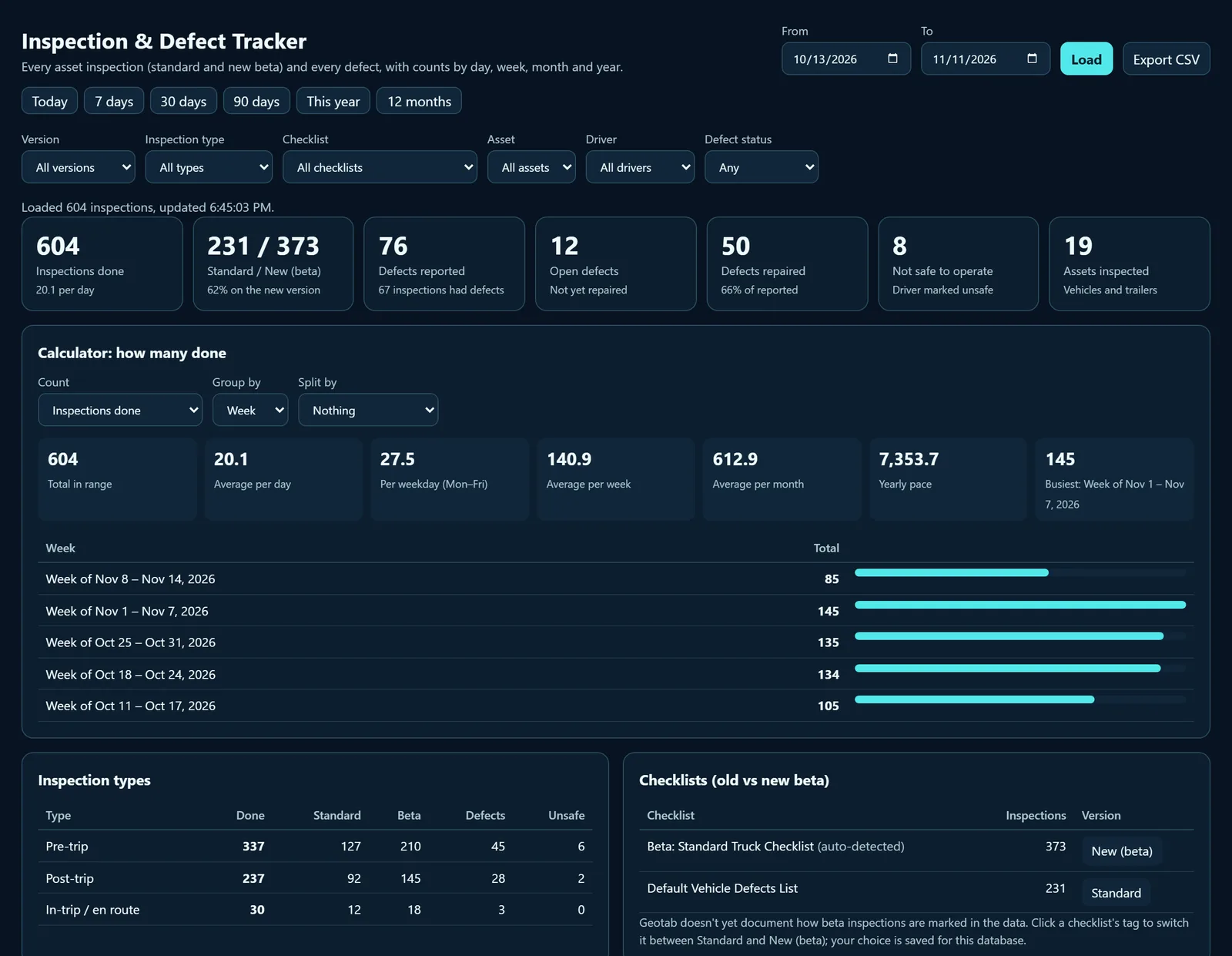
Add-ins fit when the same people look for the same answer every day. A safety manager who needs every open defect on one screen. A dispatcher who needs to see which crews are on a job site right now. A driver who needs to tag job photos without typing.
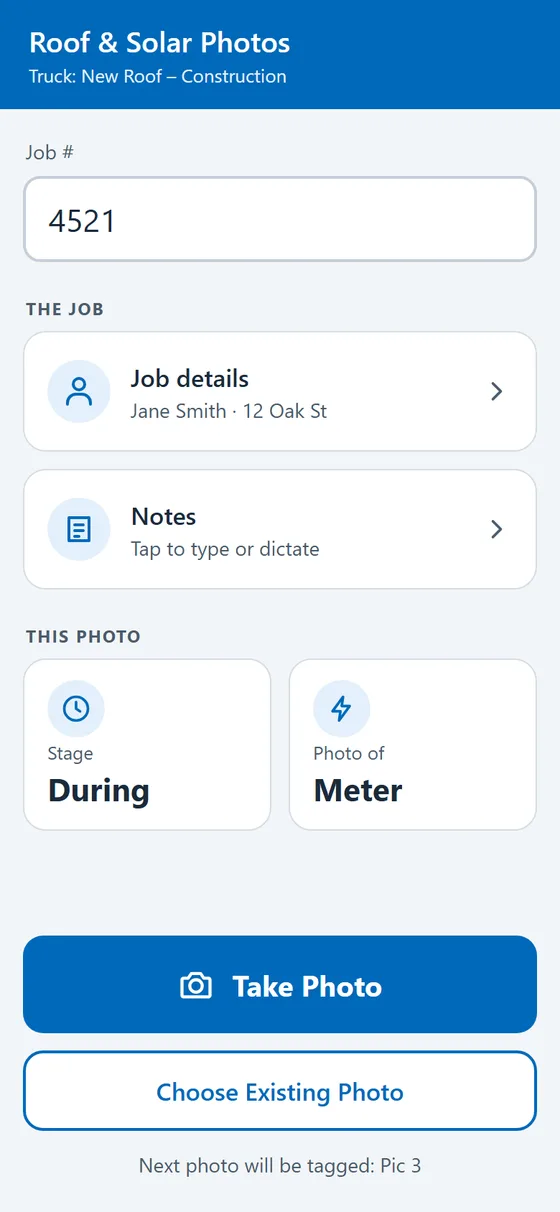
See more of what Fleet Wolf has built on the custom add-ins, AI and training page.
7. None of it works without training
A report nobody opens and an add-in nobody understands cost money and change nothing. Train each group on the part they touch: admins on rules, zones and users; drivers on Geotab Drive; managers on reports and Ace; everyone on the add-ins built for them. A one-page quick-start guide for each tool helps more than a long manual.
8. Questions to ask before you build
- Who needs this answer, and how often?
- What do they do with it once they have it?
- Does a built-in report or Ace already answer it?
- Does it need data from outside Geotab?
- Should it only read data, or also change something, such as creating a zone?
Common questions
What is Geotab Ace? The AI assistant inside MyGeotab. You ask in plain language and it answers from your Geotab data. Availability depends on your account.
What is a MyGeotab add-in? A custom page in the MyGeotab menu or the Geotab Drive app that uses each person's existing sign-in.
Does a custom add-in change my Geotab data? Only if it's built to. Reporting and AI builds start read-only, and anything that writes data is scoped and tested with you first.
Do I need a custom build? Try the built-in reports and Ace first. If someone still rebuilds the same spreadsheet every week, a custom report or add-in usually pays for itself in time saved.
Have a question your team keeps answering by hand? Tell us what to build or call (626) 384-9013.